Mastering jq: A Practical Guide to JSON Processing with Examples
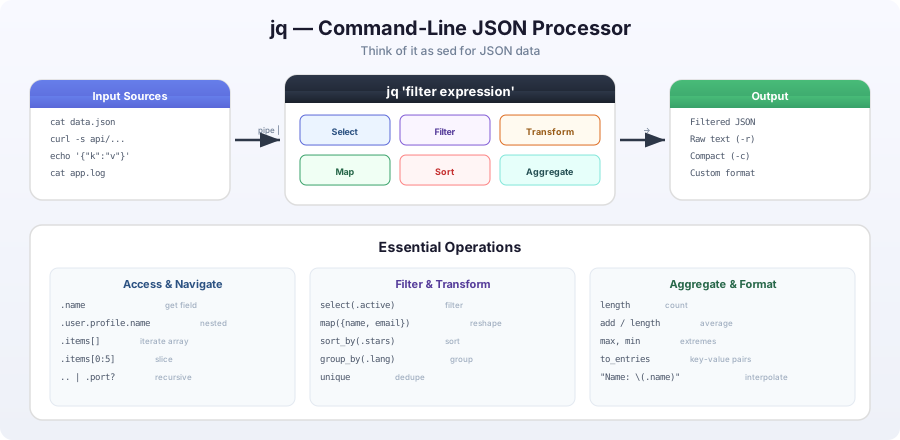
What is jq?
jq is a lightweight and flexible command-line JSON processor. Think of it as sed for JSON data - you can use it to slice, filter, map, and transform structured data with ease.
Installation
Linux (Ubuntu/Debian)
sudo apt-get install jqmacOS
brew install jqWindows
Download from the official jq website
Basic Usage
Reading JSON Files
# Read from a file
jq '.' data.json

# Read from stdin
echo '{"name": "John", "age": 30}' | jq '.'

# Read from URL (with curl)
curl -s https://api.example.com/data | jq '.'
Basic Filtering
# Get specific field
jq '.name' data.json

# Get multiple fields
jq '.name, .age' data.json

# Get nested fields
jq '.user.profile.name' data.json
Practical Examples
Filtering Users: Select, Extract, and Count Operations
Input JSON:
{
  "users": [
    {
      "id": 1,
      "name": "Alice",
      "email": "alice@example.com",
      "age": 28,
      "active": true
    },
    {
      "id": 2,
      "name": "Bob",
      "email": "bob@example.com",
      "age": 35,
      "active": false
    },
    {
      "id": 3,
      "name": "Charlie",
      "email": "charlie@example.com",
      "age": 22,
      "active": true
    }
  ]
}
Useful jq commands:
# Get all user names
jq '.users[].name' users.json

# Get active users only
jq '.users[] | select(.active == true)' users.json

# Get users over 25
jq '.users[] | select(.age > 25)' users.json

# Get names of active users
jq '.users[] | select(.active) | .name' users.json

# Count total users
jq '.users | length' users.json

# Get user emails as array
jq '[.users[].email]' users.json
GitHub Repository Analysis: Sorting, Grouping, and Aggregation
Input JSON (GitHub API response):
{
  "total_count": 3,
  "items": [
    {
      "name": "repo1",
      "full_name": "user/repo1",
      "html_url": "https://github.com/user/repo1",
      "description": "First repository",
      "stargazers_count": 150,
      "language": "JavaScript"
    },
    {
      "name": "repo2",
      "full_name": "user/repo2",
      "html_url": "https://github.com/user/repo2",
      "description": "Second repository",
      "stargazers_count": 89,
      "language": "Python"
    },
    {
      "name": "repo3",
      "full_name": "user/repo3",
      "html_url": "https://github.com/user/repo3",
      "description": "Third repository",
      "stargazers_count": 42,
      "language": "Go"
    }
  ]
}
Useful jq commands:
# Get repository names and star counts
jq '.items[] | {name: .name, stars: .stargazers_count}' repos.json

# Get repositories with more than 100 stars
jq '.items[] | select(.stargazers_count > 100)' repos.json

# Get repository URLs
jq '.items[].html_url' repos.json

# Group by programming language
jq '.items | group_by(.language) | map({language: .[0].language, count: length})' repos.json

# Sort by star count (descending)
jq '.items | sort_by(.stargazers_count) | reverse' repos.json

# Create a summary
jq '{
  total_repos: .total_count,
  total_stars: (.items | map(.stargazers_count) | add),
  languages: (.items | map(.language) | unique)
}' repos.json
Configuration Extraction: Deep Navigation and Structure Transformation
Input JSON (configuration):
{
  "app": {
    "name": "MyApp",
    "version": "1.2.3",
    "settings": {
      "debug": true,
      "port": 8080,
      "database": {
        "host": "localhost",
        "port": 5432,
        "name": "myapp_db"
      }
    }
  },
  "features": {
    "auth": true,
    "logging": false,
    "cache": {
      "enabled": true,
      "ttl": 3600
    }
  }
}
Useful jq commands:
# Get database configuration
jq '.app.settings.database' config.json

# Get all enabled features
jq '.features | to_entries | map(select(.value == true or (.value | type == "object" and .value.enabled == true)) | .key)' config.json

# Extract all port numbers
jq '.. | .port? | numbers' config.json

# Create simplified config
jq '{
  app_name: .app.name,
  version: .app.version,
  debug: .app.settings.debug,
  database: .app.settings.database.name
}' config.json
Advanced jq Features
String Operations: Case Conversion, Concatenation, and Interpolation
# Convert to uppercase
jq '.name | ascii_upcase' data.json

# String concatenation
jq '.first_name + " " + .last_name' data.json

# String interpolation
jq '"Name: \(.name), Age: \(.age)"' data.json
Mathematical Calculations: Sum, Average, and Maximum Values
# Calculate average
jq '.numbers | add / length' data.json

# Find maximum value
jq '.numbers | max' data.json

# Sum specific fields
jq '[.users[].age] | add' users.json
Conditional Processing: If-Else Statements and Status Assignment
# Conditional assignment
jq '.status = if .active then "active" else "inactive" end' user.json

# Multiple conditions
jq 'if .age < 18 then "minor" elif .age < 65 then "adult" else "senior" end' user.json
Array Manipulation: Mapping, Filtering, and Slicing
# Filter and map
jq '.users | map(select(.active) | {name: .name, email: .email})' users.json

# Unique values
jq '.languages | unique' data.json

# Array slicing
jq '.items[0:5]' data.json  # First 5 items
jq '.items[-5:]' data.json  # Last 5 items
Real-World Use Cases
1. Log Analysis
# Extract error messages from logs
cat app.log | jq -r 'select(.level == "ERROR") | .message'

# Count errors by type
cat app.log | jq -r '.level' | sort | uniq -c
2. API Monitoring
# Check API health status
curl -s https://api.status.example.com/health | jq '.status == "healthy"'

# Extract specific metrics
curl -s https://api.metrics.example.com/stats | jq '.response_time.p95, .error_rate'
3. Configuration Management
# Compare two config files
diff <(jq -S . config1.json) <(jq -S . config2.json)

# Extract environment variables
jq -r 'to_entries | map("export \(.key)=\(.value|tostring)") | .[]' env.json
Tips and Best Practices
-
Use
-rfor raw output when you want plain text without JSON formatting:jq -r '.name' data.json -
Use
-cfor compact output when processing large datasets:jq -c '.' large-file.json -
Combine with other tools for powerful pipelines:
cat log.json | jq '.timestamp' | sort | uniq -c -
Use
--argfor passing variables:jq --arg user "alice" '.users[] | select(.name == $user)' users.json -
Handle errors gracefully with
//operator:jq '.optional_field // "default"' data.json
Conclusion
jq is an incredibly powerful tool for JSON processing that can save you significant time when working with structured data. Start with basic field extraction and gradually explore more advanced features like filtering, mapping, and transformation.
Remember: The best way to learn jq is through practice. Start incorporating it into your daily workflow, and soon you’ll find yourself reaching for jq whenever you need to process JSON data.