Run OpenClaw on Claude Code Max: Skip the API Key, Use Your Subscription
If you’re running OpenClaw as your personal AI assistant and paying for Anthropic API keys separately from your Claude Code Max subscription, you’re paying twice. OpenClaw has a built-in CLI backend that can route all LLM calls through the claude CLI — which means your Max subscription covers everything.
Here’s exactly how to set it up.
The Problem
OpenClaw’s default configuration uses the Anthropic API directly:
{
  agent: {
    model: "anthropic/claude-opus-4-6",
  },
}
This requires an sk-ant-... API key from console.anthropic.com, billed per token. If you try to use a Claude Code OAuth token instead, you get:
HTTP 401: authentication_error: OAuth authentication is currently not supported.The Anthropic API rejects OAuth tokens. Claude Code Max uses OAuth internally, and there’s no way to extract a standard API key from it.
The Solution: CLI Backend
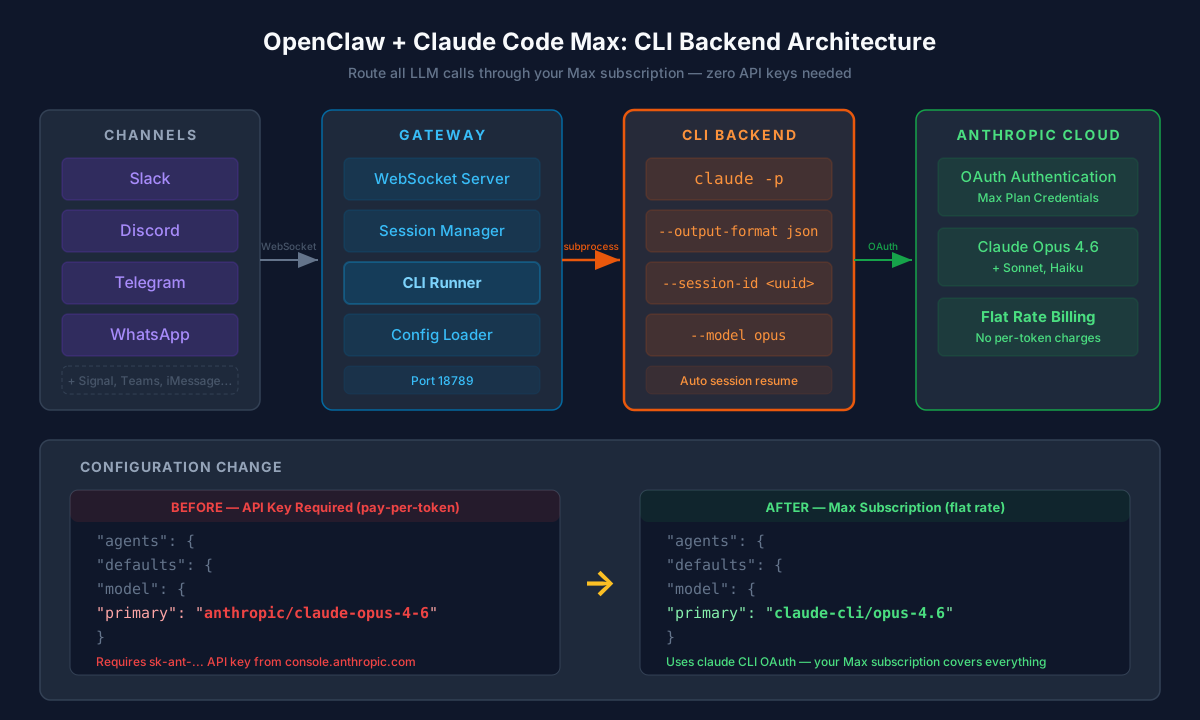
OpenClaw ships with a cli-runner system that can spawn any CLI tool as an LLM backend. Instead of making API calls, it runs claude -p "your prompt" as a subprocess. The claude CLI handles authentication via your Max subscription’s OAuth — OpenClaw never touches the API directly.
Step 1: Install and Authenticate Claude CLI
On your server (where OpenClaw runs):
# Install Claude Code CLI
npm install -g @anthropic-ai/claude-code

# Authenticate with your Max plan
claude login
Verify it works:
claude -p "hello"Step 2: Update OpenClaw Config
Edit ~/.openclaw/openclaw.json. Change the model from anthropic/... to claude-cli/...:
Before:
{
  "agents": {
    "defaults": {
      "model": {
        "primary": "anthropic/claude-opus-4-6"
      },
      "models": {
        "anthropic/claude-opus-4-6": {
          "params": { "context1m": true }
        }
      }
    }
  }
}
After:
{
  "agents": {
    "defaults": {
      "model": {
        "primary": "claude-cli/opus-4.6"
      },
      "models": {
        "claude-cli/opus-4.6": {
          "params": { "context1m": true }
        }
      }
    }
  }
}
Step 3: Update Subagent Models
If you have subagents (scout, guard, quant, etc.) using API-based models, update those too:
// Before
{ "id": "scout", "model": "anthropic/claude-sonnet-4-5" }

// After
{ "id": "scout", "model": "claude-cli/sonnet" }
Step 4: Restart the Gateway
openclaw gateway restartThat’s it. Every LLM call now routes through claude CLI using your Max subscription.
How It Works Under the Hood
When OpenClaw receives a message (from Slack, Discord, Telegram, etc.), the flow looks like this:
Slack message → Gateway → Session Resolution → CLI Runner
  → spawns: claude -p --output-format json --model opus "prompt"
  → claude CLI authenticates via OAuth (Max plan)
  → response JSON parsed → Gateway → Slack reply
The CLI runner manages sessions automatically:
- First message:
claude -p --output-format json --session-id <uuid> "prompt" - Follow-ups:
claude -p --output-format json --resume <session-id> "prompt"
Model Aliases
The built-in claude-cli backend maps friendly names to CLI model flags:
| Config Model | CLI Flag |
|---|---|
claude-cli/opus |
--model opus |
claude-cli/opus-4.6 |
--model opus |
claude-cli/sonnet |
--model sonnet |
claude-cli/sonnet-4.5 |
--model sonnet |
claude-cli/haiku |
--model haiku |
What’s Different from API Mode
| Feature | API Mode | CLI Backend |
|---|---|---|
| Authentication | sk-ant-... API key |
OAuth (Max subscription) |
| Billing | Per-token | Flat subscription |
| Streaming | Real-time token streaming | Collected response |
| Tools | Full tool execution | Text-only responses |
| Latency | Direct API call | Subprocess spawn overhead |
The main trade-off is no tool execution and no streaming. For a messaging assistant, this is usually fine — responses arrive as complete messages anyway.
Full Config Example
Here’s a complete openclaw.json with CLI backend, Slack channel, and multiple subagents:
{
  "agents": {
    "defaults": {
      "model": {
        "primary": "claude-cli/opus-4.6"
      },
      "models": {
        "claude-cli/opus-4.6": {
          "params": { "context1m": true }
        }
      },
      "blockStreamingDefault": "on",
      "maxConcurrent": 4,
      "subagents": { "maxConcurrent": 8 }
    },
    "list": [
      {
        "id": "main",
        "default": true,
        "workspace": "~/.openclaw/workspace"
      },
      {
        "id": "scout",
        "model": "claude-cli/sonnet",
        "workspace": "~/.openclaw/workspace-scout",
        "tools": {
          "deny": ["browser", "canvas", "nodes", "cron", "message", "gateway", "tts"]
        }
      }
    ]
  },
  "channels": {
    "slack": {
      "mode": "socket",
      "enabled": true,
      "streaming": false,
      "groupPolicy": "allowlist",
      "dm": {
        "policy": "allowlist",
        "allowFrom": ["U_YOUR_SLACK_USER_ID"]
      },
      "channels": {
        "#your-channel": {
          "allow": true,
          "requireMention": false
        }
      }
    }
  },
  "gateway": {
    "port": 18789,
    "mode": "local",
    "bind": "loopback"
  }
}Troubleshooting
“Not logged in · Please run /login”
The claude CLI on your server isn’t authenticated. SSH in and run claude login.
“missing_recipient_team_id” in Slack
Disable Slack streaming (it’s a known issue with Slack’s streaming API):
{
  "channels": {
    "slack": {
      "streaming": false
    }
  }
}
Subagent timeouts
CLI backend is slower than direct API calls due to subprocess overhead. Increase timeouts if subagents are timing out:
{
  "agents": {
    "defaults": {
      "maxConcurrent": 2
    }
  }
}
Want to use API as fallback
You can configure CLI backend as primary with API fallback:
{
  "agents": {
    "defaults": {
      "model": {
        "primary": "claude-cli/opus-4.6",
        "fallbacks": ["anthropic/claude-sonnet-4-5"]
      }
    }
  }
}Why This Matters
Claude Code Max is a flat-rate subscription. The Anthropic API is pay-per-token. If you’re running an always-on assistant across Slack, Discord, and WhatsApp, API costs add up fast — especially with Opus.
By routing through the CLI backend, your entire OpenClaw deployment runs on your existing Max subscription. The trade-off (no streaming, no native tools, subprocess overhead) is minimal for a messaging assistant where responses are delivered as complete messages anyway.
One config change. Zero additional billing.
Running OpenClaw with Claude Code Max on Ubuntu. Source: github.com/openclaw/openclaw. Setup tool: docs.openclaw.ai.