What AI Agent Teams Actually Ship: 7 Use Cases, 21 Blog Posts, 5 Smart Contracts
I’ve been building autonomous AI agent teams that take a direction and ship it to production. Not demos. Not toy examples. Full products with deployed contracts, live frontends, published research, and bilingual blog series.
Here’s what different team configurations have actually produced.
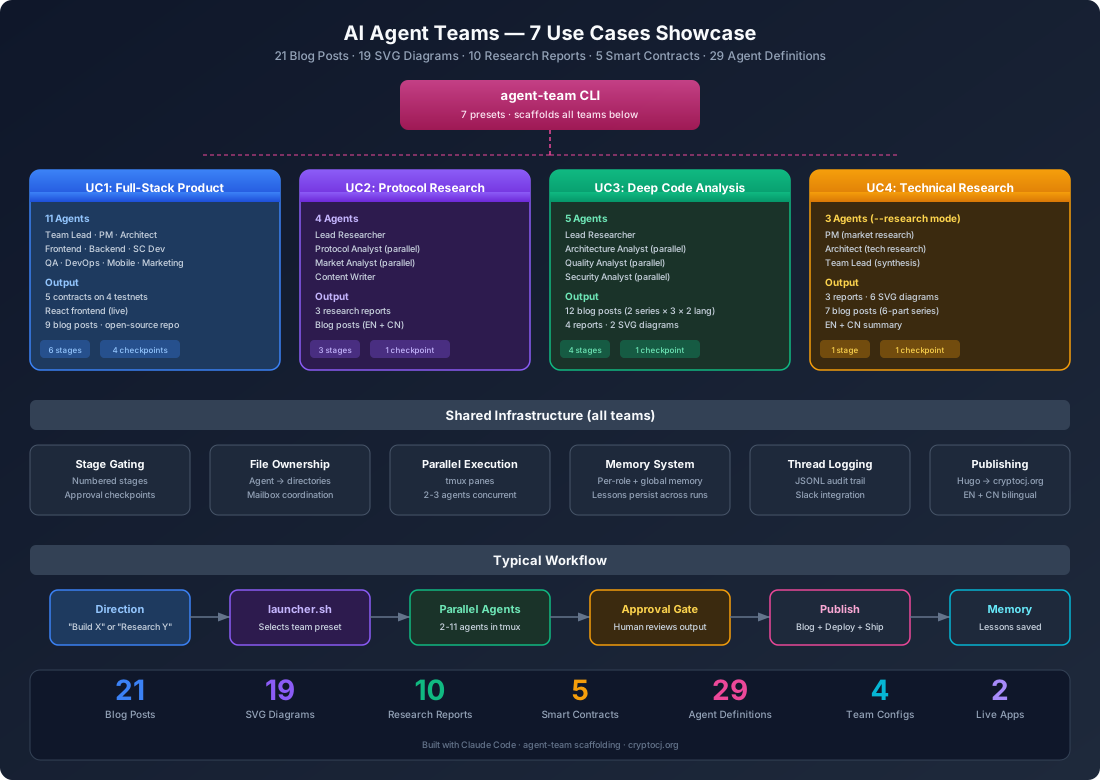
Use Case 1: Full-Stack Product Development
Team: 11 agents (Team Lead, PM, Architect, Frontend Dev, Backend Dev, Smart Contract Dev, QA, DevOps, Mobile Dev, Marketing, Content Publisher)
Input: “Build a cross-chain ERC20 token bridge using LayerZero V2”
Output:
- 5 smart contracts deployed across 4 testnets (Sepolia, Arbitrum Sepolia, Base Sepolia, Optimism Sepolia)
- React frontend live at bridge-app-erc.pages.dev
- 12 directional bridging pathways, all trustless with multi-DVN verification
- Open-source repository at github.com/gnuser/brg-bridge
- 9 blog posts covering architecture, message lifecycle, DVN security, OFT token bridging, composed messages, and developer gotchas
How it works: The Team Lead receives the product direction, spawns PM for market research and Architect for technical research, then orchestrates 6 stages — from spec writing through deployment. Agents communicate via mailbox files, each owns specific directories, and the Team Lead gates progress through approval checkpoints.
Key insight: The hardest part wasn’t writing code. It was LayerZero V2’s testnet behavior differing from documentation. The agent team discovered Type 3 options don’t work without ULN config on testnets, that LZ Scan doesn’t index small projects, and that you have to verify delivery on-chain by extracting the GUID from OFTSent events. All lessons were persisted to agent memory files for future runs.
Use Case 2: Protocol & Market Research
Team: 4 agents (Lead Researcher, Protocol Analyst, Market Analyst, Content Writer)
Input: ./launcher.sh "OpenClaw" — research an open-source AI agent framework
Output:
- Protocol analysis report covering architecture, message flow, agent lifecycle
- Market analysis report with competitive landscape, adoption metrics, positioning
- Synthesized research brief with executive summary
- Blog posts (EN + CN) published to cryptocj.org
How it works: Lead Researcher clones the topic, spawns Protocol Analyst and Market Analyst in parallel. Each writes to their owned output file. Lead cross-reviews both reports, synthesizes a brief, and triggers an approval checkpoint. After approval, Content Writer produces bilingual blog posts.
Key insight: Running Protocol and Market analysts in parallel cuts research time dramatically. The cross-review step catches contradictions — like when the market analyst rated adoption as “early stage” but the protocol analyst found 161 production gateway files, suggesting more maturity than expected.
Use Case 3: Deep Code Analysis
Team: 5 agents (Lead Researcher, Architecture Analyst, Quality Analyst, Security Analyst, Content Writer)
Input: ./launcher.sh "openclaw/openclaw" — deep-dive a GitHub repository
Output:
- Architecture analysis: module graph, design patterns, dependency analysis, build system, API surface
- Quality analysis: testing coverage, error handling, code smells, documentation quality
- Security analysis: vulnerability scan, auth patterns, crypto usage, supply chain review
- Synthesized brief with severity-rated findings
- 12 blog posts (2 series × 3 parts × EN/CN) published to cryptocj.org
- 2 SVG architecture diagrams
How it works: Stage 0 clones the repo with gh repo clone (handles auth automatically). Stage 1 spawns 3 analysts in parallel — Architecture, Quality, and Security — each reading the actual codebase with Read, Glob, Grep, running cloc, cargo audit/npm audit, and examining git history. Stage 2 synthesizes. Stage 3 publishes.
Key insight: The Security Analyst found that OpenClaw implements two-phase symlink detection for Docker sandbox escapes — something most sandboxes skip. The Architecture Analyst mapped the 8-level routing engine. The Quality Analyst discovered the 13-step hook pipeline. None of these findings would have emerged from surface-level analysis. You need agents that actually read every file.
Use Case 4: Technical Research with Diagrams
Team: ai-team in --research mode (PM + Architect + Team Lead)
Input: ./launcher.sh --research "LayerZero V2"
Output:
- 3 research reports (tech research, market research, synthesized brief)
- 6 SVG architecture diagrams covering the entire protocol
- 7 blog posts (6-part deep-dive series + summary post in EN/CN)
How it works: The --research flag runs only Stage 0 — PM does market research while Architect does technical research. Team Lead synthesizes a brief, gets approval, then Content Publisher writes the blog series. Each part gets its own SVG diagram.
Key insight: The 6 SVG diagrams were the most valuable output. They became reusable references for the bridge development that followed. Research-first, build-second is a powerful pattern — the agents discovered LayerZero’s gotchas before writing a single line of contract code.
Use Case 5: Agent Team Scaffolding
Tool: agent-team CLI at github.com/gnuser/agent-team
Input: agent-team create my-project --preset fullstack-web3
Output: A complete agent team project with:
- Agent definitions (
.claude/agents/*.md) - Role-specific skills (
.claude/skills/roles/*.md) - Common skills (stage awareness, handoff protocol, team communication)
- Launcher script with tmux integration
- Thread logging infrastructure
- Memory system (
global.md+ per-role memory files)
Presets available: fullstack-web3, fullstack-web, fullstack-node, research, code-research, mobile, minimal
Key insight: Every team described in this post was scaffolded from templates. The scaffolding tool captures patterns that work — stage gating, file ownership, mailbox communication, thread logging — so new teams start with battle-tested infrastructure.
Use Case 6: Core Flow Tracing
Team: 4 parallel research agents + Content Writer (ad-hoc)
Input: “Deep analysis the core flow of OpenClaw”
Output:
- 3-part “Core Flow” blog series (EN + CN = 6 posts)
- Function-by-function walkthrough of the entire message path
- SVG diagram showing gateway → routing → agent loop → tools → memory → hooks
What was traced:
- WebSocket handshake →
chat.send→dispatchInboundMessage()(Gateway) - 8-level routing → MsgContext normalization → double-loop state machine (Agent Runtime)
- Docker sandbox execution → SSRF protection → hybrid memory search → 13-step hook pipeline (Tools & Memory)
Key insight: Four research agents ran in parallel, each tracing a different subsystem. The gateway agent, routing agent, agent-runtime agent, and tools/memory agent all read the actual source code simultaneously. Results were cross-referenced to build a coherent end-to-end trace — from WhatsApp webhook to WebSocket broadcast.
Use Case 7: Open-Source Repository
Output: github.com/gnuser/brg-bridge
The bridge project was extracted from the ai-team workspace into a standalone open-source repository with its own architecture diagram and clean documentation. This demonstrates that agent-built code is production-quality enough to open-source.
By the Numbers
| Metric | Count |
|---|---|
| Blog posts published | 21 |
| SVG architecture diagrams | 19 |
| Research reports | 10 |
| Smart contracts deployed | 5 |
| Live frontend apps | 1 |
| Agent definitions created | 29 |
| Agent team configurations | 4 |
| Languages (blog) | 2 (EN + CN) |
| Testnets deployed to | 4 |
| Open-source repositories | 2 |
What Makes It Work
Stage gating. Every team progresses through numbered stages with approval checkpoints. No agent can skip ahead. This prevents the “AI went off the rails” failure mode.
File ownership. Each agent owns specific files and directories. Cross-boundary edits require explicit coordination. This prevents merge conflicts and ensures accountability.
Parallel execution. Research agents, analysts, and developers run simultaneously in tmux panes. A typical research run spawns 2-3 agents in parallel, cutting wall-clock time significantly.
Memory persistence. Lessons learned are written to .claude/memory/ files. When an agent discovers that LayerZero Type 3 options don’t work on testnet, that knowledge survives across sessions.
Thread logging. Every agent interaction is logged as JSONL. When something goes wrong, you can trace exactly what happened, what each agent decided, and why.
All teams are built on Claude Code with the agent-team scaffolding tool. Source: github.com/gnuser/agent-team. Blog: cryptocj.org.